Variables
PoolObject
Generic Pool system for unity Objects
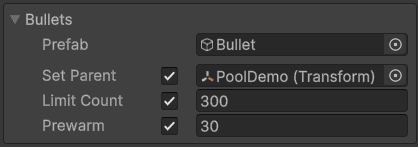
You will be able to choose a prefab
A default parent
A maximum count of object possible
A prewarm count created on the Initialization
Methods :
Initializes the pool.
Creates and deactivates instances if prewarming is enabled.
Call before use or it will be called automatically on first access.
Retrieves an instance from the pool and activates it.
Returns true if an instance is provided, otherwise false if the maximum size is reached.
param "t" Retrieved instance
param "parent" Optional parent for the retrieved instance, otherwise uses "PoolObject{T}.parent"
Returns an instance to the pool. The instance is deactivated and reassigned under "parent"
If the limit is reached, the instance is destroyed.
Creates a new instance from the prefab referenced
Automatically called if the pool is empty.
Sets the default parent used during pool operations.
param "parent" Parent transform to use
Require the namespace MVsTookit.Pool